Sketch to floor plan
Photograph a hand-drawn sketch and get a clean plan and a 3D room.
Example sketch
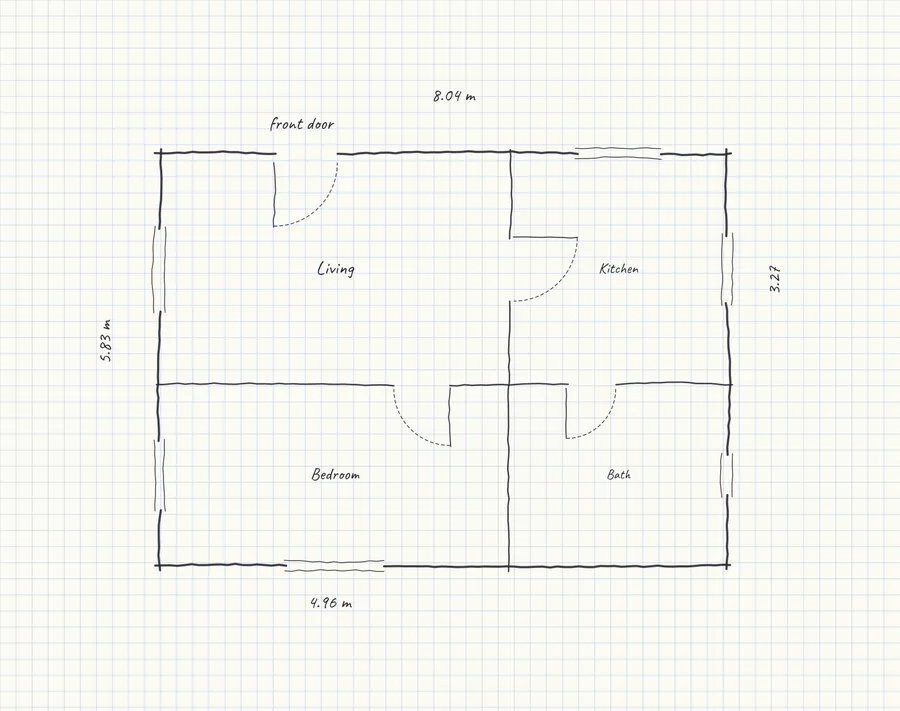
Draw the rooms, write one length on it, and take a photo.
JPEG, PNG, WEBP or iPhone HEIC. No sign-up.
Four rooms, 47 m²
This is what the example sketch reads as. Take a photo of yours to get its plan. 8.04 m × 5.83 m overall: Living (16 m²), Kitchen (10 m²), Bedroom (13 m²) and Bath (7.9 m²). With four doors and six windows. Check it against your sketch: it's only as right as the measurements written on it.
Floor area
47 m²
Overall
8.04 m × 5.83 m
Doors · windows
4 · 6
Want to furnish it? The app reads the same photo into a plan you can edit, fill with furniture at real sizes, save and share.
Free account. Or try the example flat, no account needed.
The short answer
Take a photo of a floor plan you drew by hand and this tool redraws it as a clean plan: straight walls, doors and windows in their gaps, every room named with its area, and the overall size. The same plan stands up as a 3D room you can turn around.
It reads the sketch with the same AI that reads uploaded floor plans in UploadFloorplan, so it follows the measurements you wrote on the paper rather than guessing from the drawing. Write at least one length on the sketch, ideally the overall width, and the rest is scaled from it. A sketch is only as right as its numbers, so check the result against what you measured.
How to use it
- 1
Draw the rooms and write a length on it
Any paper works, grid paper is easiest. Draw the walls, leave gaps for doors and windows, name the rooms, and write down at least one measurement.
- 2
Take a photo of it
On a phone, tap Take a photo and hold it straight above the page in good light. On a computer, choose a photo or a scan. iPhone photos (HEIC) are fine.
- 3
Check the plan, then turn it around
About half a minute later you get a clean 2D plan with the room areas, and the same plan in 3D. Save the plan as an image, or continue in the app to furnish it.
Questions
Can I turn a hand-drawn sketch into a floor plan for free?
Yes. Take a photo of the sketch here and you get a clean plan and a 3D view, with no account. Each visitor can read a couple of sketches a day; when the day's allowance is used up, the page says so and you can try again tomorrow.
What makes a sketch read well?
Clear walls drawn as lines, gaps where the doors and windows are, a name in each room, and at least one written measurement, best the overall width and depth. Photograph it from straight above in daylight so the page isn't skewed or in shadow.
Does it work without measurements?
Not well. Without a number on the paper there's nothing to scale the drawing from, and the plan may be refused or come out the wrong size. One measurement is enough to set the scale; more of them make it more accurate.
Can I take the photo with my phone?
Yes. On a phone, Take a photo opens the camera. Photos from the gallery and iPhone HEIC photos work too: they're converted and scaled down in your browser before they're sent.
What happens to my photo?
It's sent to the AI model that reads it and isn't kept by this page: nothing is saved to an account, and the plan stays in your browser until you leave the page.
Can I furnish the plan or change it?
That's what the app is for. Upload the same photo to UploadFloorplan with a free account and you get the plan as a room you can edit, furnish with real sizes, save and share.
Now try it in your real room
Upload your floor plan and UploadFloorplan turns it into a 3D room with its walls, doors and windows. Drag the furniture in and see what fits where.
Free account. Or try the example flat, no account needed.
More free tools
All tools
Living room
Will my sofa fit?
Type your room and sofa sizes and see the sofa in a 3D room, with the walking space it leaves.
Floor plans
Floor plan to 3D
Upload a floor plan and walk through it in 3D in under a minute. No sign-up.
Floor plans
Measure a floor plan
Set the length of one wall you know and measure every other wall on the plan.
Floor plans
Floor plan area calculator
Upload a plan and get the floor area of every room, in m² or sq ft.
Floor plans
Floor plan redraw
Turn a blurry scan into a clean, labelled 2D plan you can share.
Renovation
Paint calculator
How many litres for the walls and ceiling, shown on your room.